
Course management in Orphy

From course planning to invoice

Programmes and seminars spread across several locations and taught by many specialists create a great deal of coordination work — as soon as the timetable, instructor scheduling, registrations and invoicing live in separate tools. Orphy brings the whole workflow into one system.
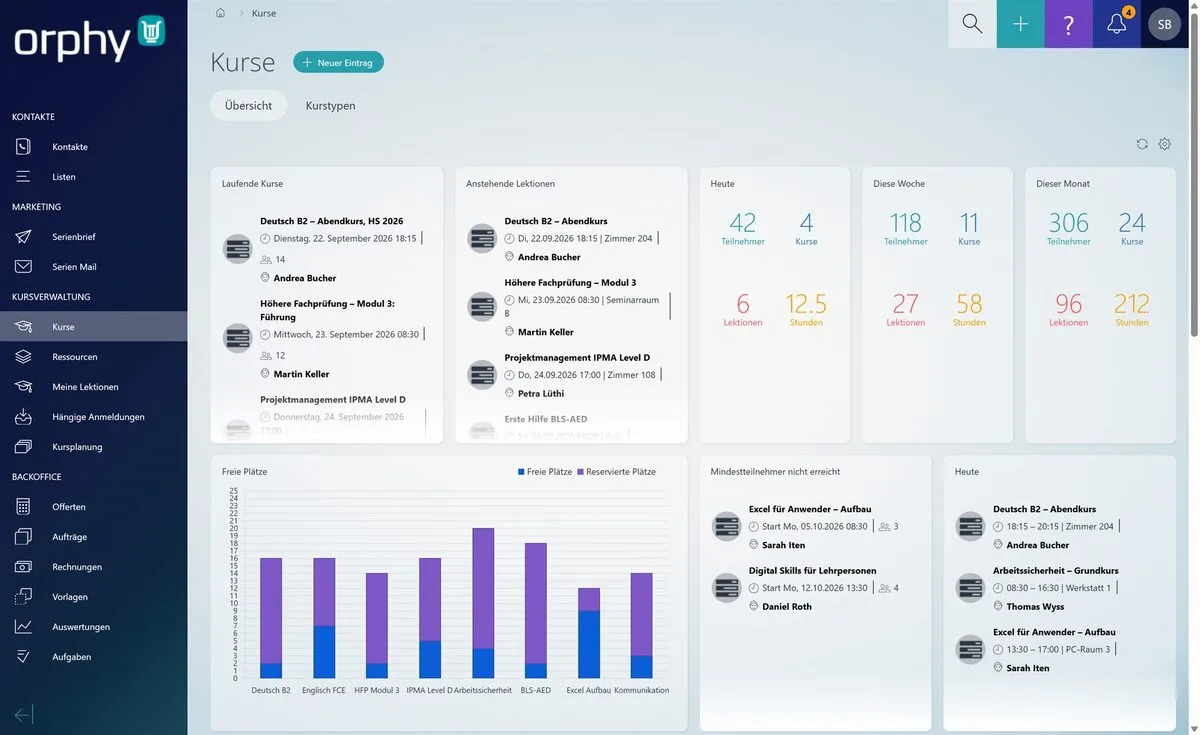
Orphy — course overview with key figures, free seats and open items.

What you gain

  • Plan courses, lessons, rooms and instructors in one place
  • Spot double bookings and missing assignments early
  • Process registrations, course documents, attendance and invoices end to end
  • Keep workload, free seats and key figures in view at all times
Workflow

One course, four phases — one system

No exporting between tools, nothing entered twice: what is created during planning carries through to the invoice.

The course type is the template, the course the run, the lesson the date.

  • Course types as a template: lesson duration, minimum and maximum participants, invoice template and checklist set once
  • Courses with course number, state and web categories — from draft to published, in progress and follow-up
  • Lessons with date, duration, location, content and learning goals
  • Rooms, equipment and instructors assigned per lesson — resources of the same kind as a pool
  • Duplicate a whole course and move all its lessons as a block to a new start date
  • Checklists for course preparation, with an owner and a due date

Registration runs through your website and lands straight in the course.

  • Online registration form on your own website, with course selection and free seats
  • A registration only becomes valid once the confirmation link in the e-mail is clicked
  • Waiting list as soon as a course is full
  • Pending registrations reviewed, confirmed or followed up in one place
  • State invited, provisional or definitive — invited participants are unsubscribed automatically after a configured period
  • Course options, coupons and an early booking discount that applies until the minimum number of participants is reached

Instructors work in the same application — without extra lists.

  • A dedicated “My lessons” view for instructors, with its own permission
  • Calendar subscription for instructors and resources — lessons appear in their own calendar
  • Attendance recorded on the lesson itself: present, absent or late
  • Attendance list and attendance report, optionally with a signature at the start and end of the course
  • Automatic reminder e-mail to participants, including the course documents
  • Instructors’ working time is recorded automatically per lesson

The invoice follows from the registration — not from a second list.

  • Automatic invoicing, 1 to 12 weeks before the course starts
  • Invoice template per course type
  • Every participation shows when the draft is created, when the invoice goes out and what the payment state is
  • If an e-mail address is missing, the system says so — instead of quietly sending nothing
  • Cancelling a participation also cancels the linked invoices
  • Payment due date optionally set to the course start
Overview

Course operations on one screen

The course overview brings together what otherwise sits in several files. Which cards appear is up to you.
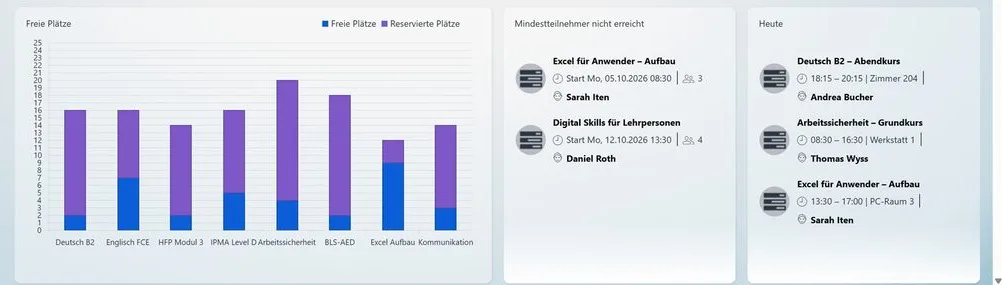
  • Ongoing courses and upcoming lessons with date, room and instructor
  • Participants, courses, lessons and hours for today, this week and this month
  • Free and reserved seats per course as a chart
  • Courses that have not yet reached the minimum number of participants
Orphy — free and reserved seats per course, courses below the minimum number of participants and today’s lessons.

Double bookings show up before they hurt

Rooms, equipment and instructors are resources with their own occupancy. Anything booked twice appears in the list — not only on the day, in the room.
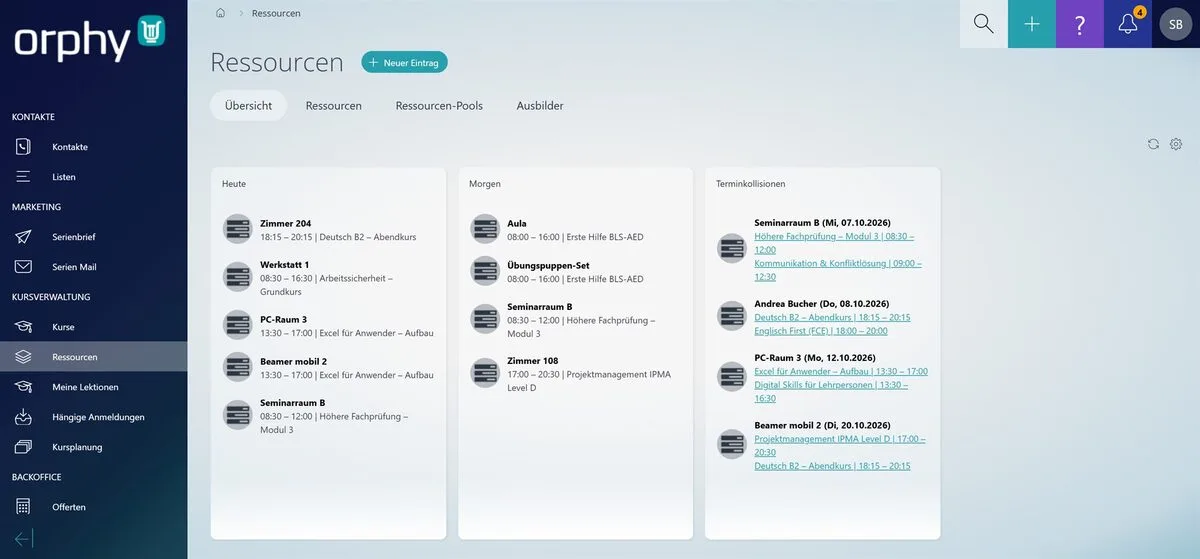
  • Occupancy for today and tomorrow, per room and per device
  • Scheduling conflicts for resources and instructors, linked to the lessons involved
  • A warning when saving — deliberately overriding it stays possible
  • Lessons without an assigned instructor on a card of their own
Orphy — resources with occupancy and scheduling conflicts.
Features

What else is in there

Course management is a menu group inside Orphy and builds on its foundation.

Overview and reporting

  • Dashboard cards composable per user
  • Workload per instructor and per resource
  • Reports on courses and course organisation
  • Full-text search across courses and resources

Traceability

  • Changes to courses, lessons and registrations stay logged
  • Separate permissions for course management, the instructor view and pending registrations
  • Back-office notes, kept apart from the notes on the course
  • Checklists can be reset per course without touching the template

Working together

  • Participants are contacts in the CRM — no second address book
  • Every registration assigns the configured customer group to the contact automatically
  • Mail merge and bulk e-mail draw on the same contacts
  • Quotes, jobs and invoices sit in the same back office

Three roles, one foundation

Each role sees what it needs — and nobody maintains a list on someone else’s behalf.

Back office

Plans courses and lessons, assigns rooms and instructors, reviews registrations and issues the invoices.

Instructors

See their lessons in their own calendar and record attendance on the spot; working time follows along.

Participants

Register online, confirm by link and receive documents, a reminder and the invoice.

Not another tool

Course management is not a separate program next to the CRM but a menu group inside it. Whatever you already maintain in contacts, templates and accounting applies here too.

More about OrphyCRM

Your data stays in Switzerland

  • Your data is stored in a Swiss data centre
  • Data is transmitted encrypted
  • Data is highly available and protected
  • Changes stay logged and traceable
swiss made software — hosted in switzerland

30 minutes, one real programme

The best way is to show it on one of your own programmes — from planning through registration to the invoice. Book an appointment directly or write to us.

Book a live demo